
The on-page SEO task list: every check we run on a page in 2026
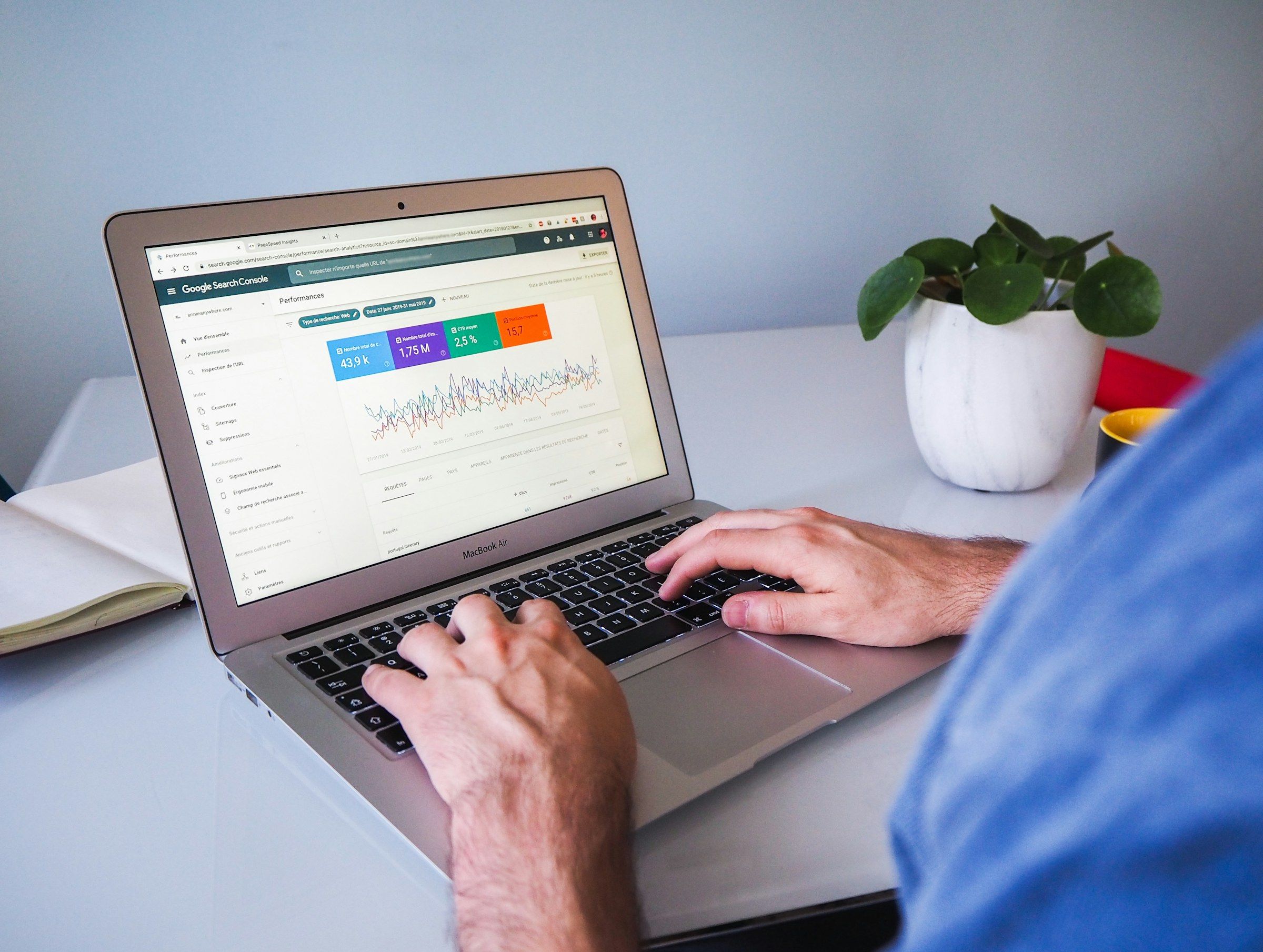
We first published this list in 2019 as the task sheet our team worked through on every client page. Search has changed a great deal since then. Meta keywords are gone, keyword density turned out to be a myth, Core Web Vitals and mobile-first indexing arrived, Google folded its helpful content system into its core ranking, and AI answers now sit on top of many results pages.
This is the 2026 version, and it is much longer than the original. It covers every check we run before a page goes live and every check we run when a page stops performing: research, writing, titles, links, images, video, structured data, speed, indexing, language versions, Arabic pages, local and ecommerce pages, AI search and measurement.
The short version: pick one search intent per page, write the best answer on the web for it, give it a clear title and outline, connect it to the rest of your site, make it fast on a phone, mark it up honestly, then measure and improve. Everything below is the detail behind those seven steps.
How to use this task list
Work through it one page at a time, not one task across the whole site. A single page that passes every check will usually outrank ten pages that pass half of them.
Start with the pages that already bring in enquiries or sit on page two of Google. Those are the fastest wins, because Google already considers them relevant and only needs a stronger signal.
Not every task applies to every page. A contact page does not need a 2,000-word body; a product page needs Product markup and a blog post does not. Skip what does not fit and be strict about what does.
The tasks are grouped into stages in the order we work. The first stage matters most: if the page targets the wrong intent, nothing below it will fix that.
| Priority | Stages | Why |
|---|---|---|
| Highest | Research and intent, titles, main content | They decide whether the page can rank at all |
| High | Internal links, indexing, mobile, speed | They decide whether Google can find, read and trust the page |
| Medium | Images, structured data, social tags, language versions | They improve how the page appears and who it reaches |
| Ongoing | Measurement, refreshes, pruning | They keep the page ranking after launch |
Stage 1: Research and search intent
1. Match one search intent
Search the term you want to rank for, in a private window, on a phone, and read the first page of results. Are they guides, product pages, comparison tables, category pages, tools or local listings? That is what Google believes the searcher wants. Build the same kind of page, then make it more complete and more useful.
Intent usually falls into four groups:
| Intent | The searcher wants to | Page that fits |
|---|---|---|
| Informational | Learn or solve a problem | Guide, explainer, checklist, how-to |
| Commercial investigation | Compare options before buying | Comparison, review, “best” list, case study |
| Transactional | Buy, book or sign up now | Product page, service page, pricing, booking |
| Navigational | Reach a specific brand or page | Homepage, login, contact, brand page |
If the results are mixed, Google is unsure, and you can choose. If they are uniform, follow them.
2. Note the result features on the page
Look at what else appears besides the ten blue links: an AI Overview, “People also ask”, videos, images, a map pack, shopping results, forum threads. Each one tells you what format to add. Videos in the results suggest a short video will help; a map pack means local signals matter; a “People also ask” box hands you your subheadings.
3. Pick one primary term and its close variations
Each page should own one main topic. Write down the primary term, two to five close variations, and the way people phrase it in full questions. Use a keyword tool for volumes if you have one, but the results page itself, autocomplete and “People also ask” are free and often more honest about what people type.
4. Collect the questions people ask
Gather questions from “People also ask”, autocomplete, forum threads, your sales calls and your support inbox. The best ones become H2s; the rest go in the FAQ. Questions from your own customers are especially valuable, because competitors cannot copy them.
5. Check that no other page on your site targets the same term
When two of your own pages chase one term, Google splits the signal and often ranks neither. This is called keyword cannibalisation. Search site:yourdomain.com "your term" and check the Queries tab in Search Console for pages that swap places. Merge them, redirect the weaker one, or give each a clearly distinct angle and link one to the other.
6. Define who the page is for and what they should do next
Write one sentence: “This page is for [reader] who wants [outcome], and after reading they should [action].” It keeps the writing focused and makes the call to action obvious. A page written for everyone converts no one.
7. Find the gap in the current results
Open the top three results and list what they cover. Then list what they miss: an outdated step, no examples, no prices or ranges, no screenshots, nothing for your market or language, no answer to the obvious follow-up question. That gap is the reason your page deserves to rank.
Stage 2: Title tag, meta description and URL
8. Write a unique title tag
The title tag is still the strongest on-page signal you control, and it is the headline people see in the results. Keep it to roughly 50 to 60 characters, put the main term near the start, and promise the outcome. Every page needs its own title.
- Lead with the topic, not the brand: “On-Page SEO Checklist for 2026” before “Anzum”.
- Add the brand at the end with a separator if there is room.
- Avoid repeating the same phrase twice, and avoid lists of keywords separated by commas.
- Match the title to the H1 closely enough that Google does not see a conflict.
9. Check how Google displays the title
Google rewrites titles it considers too long, stuffed, vague or out of line with the page. Search for the page once it is indexed. If the title shown is different, Google is telling you something: usually that the title tag and the H1 disagree, or that the title is boilerplate. Fix the cause rather than fighting the rewrite.
10. Write a meta description that earns the click
The meta description is not a ranking factor, but it shapes the snippet and the click. Google rewrites many descriptions to match the query, yet a good one is used often. Aim for about 150 characters that say who the page is for, what they get and why this result is better than the next one. Every page needs its own.
11. Keep URLs short, readable and permanent
Use lowercase words separated by hyphens, for example /on-page-seo-task-list/. Leave out dates, stop words and IDs where you can. Keep the folder structure shallow and meaningful, such as /services/seo/ rather than /page?id=482.
If a page already ranks, do not change its URL for a small gain. If you must, add a permanent 301 redirect from the old address and update your internal links to point at the new one directly.
12. Set the site name and favicon
Google shows a site name and a favicon next to every result. Add WebSite structured data with your preferred name on the homepage, keep the name consistent with your title tags, and provide a square favicon of at least 48 by 48 pixels. A clear, recognisable brand line improves clicks on every page of the site.
Stage 3: The main content
13. Use one H1 that states the topic in the reader’s words
The H1 is the headline on the page. It should match the intent and contain the main term or a close variation, but it can be warmer and longer than the title tag. One H1 per page is the clearest structure.
14. Build a logical heading outline
H2s split the page into the questions a reader has, in the order they have them. H3s break down long H2 sections. Never skip a level to get a smaller font, and never use a heading just to make text bold. If you read only the headings, they should tell the whole story of the page.
15. Answer the main question in the first few lines
Readers and AI systems both reward a page that gets to the point. State the answer or the outcome early, then expand. A two or three sentence summary under the H1 is often enough. Long introductions about why the topic matters push the answer below the fold and lose the reader.
16. Cover the topic completely
Compare your draft against the top results. Cover everything they cover, then add what they miss. Completeness does not mean length for its own sake: a calculator page may need 200 words and a guide like this one may need 8,000. It means the reader does not have to go back to the results to finish the job.
17. Show first-hand experience
Google’s quality guidance talks about experience, expertise, authoritativeness and trust, often shortened to E-E-A-T. On the page, that looks like:
- Your own examples, results, photos and screenshots, not stock descriptions.
- Specific details only someone who has done the work would know.
- Mistakes you have seen and how to avoid them.
- Clear statements of what you tested, when and how.
Experience is the hardest thing for a competitor or an AI tool to copy, which is why it pays.
18. Write for people first
Google’s own self-check asks whether the content was created mainly to help people or mainly to attract search visits. Ask yourself the same questions. Would you send this page to a customer? Does it leave the reader feeling they learned enough to act? Did you write it because the topic fits your business, or only because it has search volume? Pages built only for traffic tend to lose it in core updates.
19. Use AI tools carefully
AI writing tools are fine for research, outlines and first drafts. Google ranks the result on quality, not on how it was produced. The risk is in publishing what the tool produces without checking facts, adding experience or editing for your reader. Never publish a page you have not read in full, and never publish many near-identical pages at scale: that is the scaled content abuse pattern Google’s spam policies target.
20. Make the page easy to read
- Short paragraphs of one to four sentences.
- Plain words. Explain jargon the first time you use it.
- Bulleted lists for options, numbered lists for steps.
- Tables for comparisons, specifications and thresholds.
- Bold the key phrase of a paragraph sparingly, so a skimming reader catches it.
- A table of contents on long pages, with jump links.
Readability does not move rankings directly, but it keeps people on the page and makes the page easier to quote.
21. Add original data, examples and visuals
A number you measured, a chart from your own projects, a before and after screenshot, a template the reader can copy. Original material earns links and citations on its own, and it is the strongest signal that a page is not a rewrite of the others.
22. Avoid thin and duplicate content
A page with a few lines of text, a page that repeats another page with one word changed, or a set of near-identical location pages all count as thin. Either give each page unique substance or combine them into one strong page. If you must keep similar pages, such as product variants, point them to one canonical version.
23. Show who wrote the page and when
Add the author or company, a short author bio with relevant experience, a published date and a last-updated date. Readers trust it more, and it tells search engines the information is maintained. Only change the updated date when you change the content meaningfully; moving the date without changes is noticed.
24. Keep the content current
Facts, prices, screenshots, statistics and tools go out of date. Put a review date on every important page. Old information is one of the most common reasons a page that used to rank slowly slides.
25. Avoid keyword stuffing and hidden text
Repeating a phrase unnaturally, hiding text in the same colour as the background, stuffing alt text or footer links with keywords: all of these are explicit spam signals. They were risky in 2019 and they are pointless now. Write the term where it belongs and let the rest of the language vary naturally.
Stage 4: Internal and external links
26. Link out to the pages a reader needs next
From the new page, link to the related service or product page, the next logical guide and any definitions the reader may need. Place the most important links in the body text, close to the content they support, not only in a “related” box at the bottom.
27. Link in from older pages
Find two to five pages on your site that already rank or get traffic for related terms, and add a link from each to the new page. This is the fastest way to help Google discover the page and understand where it fits. Search Console’s Links report shows which of your pages have the most internal links to share.
28. Write descriptive anchor text
Use anchor text that tells the reader and the search engine what is on the other side: “on-page SEO task list”, not “click here” or “read more”. Vary it naturally across pages; exact-match anchors on every link look manufactured.
29. Keep important pages within a few clicks of the homepage
Pages buried five or six clicks deep get crawled less often and are treated as less important. Use hub pages, category pages and a clear main menu so that every key page is reachable in roughly three clicks.
30. Fix orphan pages
An orphan page has no internal links pointing to it. It may be in the sitemap, but Google sees no sign that you value it. Crawl your site with an SEO crawler and compare the result with your sitemap to find them, then link them in or remove them.
31. Cite sources where you make claims
Link to the original study, documentation or regulation when you quote a number or a rule. It helps readers check you, and it signals that the page is careful. Linking out to reputable sources does not leak ranking strength in any way worth worrying about.
32. Use the right link attributes
rel="sponsored"for paid links, affiliate links and advertising.rel="ugc"for links in comments and forum posts.rel="nofollow"when you do not want to vouch for a link and neither of the others fits.- Plain links for everything you genuinely recommend.
Paid links without sponsored or nofollow break Google’s link spam policy.
33. Check for broken links and redirect chains
A link to a missing page wastes the reader’s click and the crawler’s time. A link that passes through two or three redirects slows both down. Crawl the page, fix broken links, and point internal links straight at the final URL.
Stage 5: Images and video
34. Name image files descriptively
on-page-seo-checklist.jpg, not IMG_2931.jpg. File names are a small signal for image search and a useful one for anyone who downloads the file.
35. Write useful alt text
Alt text describes what the image shows for people using screen readers, and it is the main way search engines understand an image. Describe the image in plain words in about 125 characters or fewer. Include the topic where it is natural; do not paste a keyword list. Purely decorative images should have an empty alt="" so screen readers skip them.
36. Serve modern formats at the right size
Serve AVIF or WebP, with JPEG as a fallback where needed, and never send a 3,000 pixel image to a 400 pixel slot. Use srcset and sizes so phones download small versions. Image weight is the most common cause of slow pages we see.
37. Set width and height on every image
Width and height attributes, or a CSS aspect ratio, reserve the space before the image loads. Without them the text jumps down when the image arrives, which hurts Cumulative Layout Shift and annoys readers.
38. Lazy-load images below the fold, never the main one
Add loading="lazy" to images further down the page. Do not lazy-load the hero or the first large image: that is usually the Largest Contentful Paint element, and delaying it slows your main speed metric. Give that one image fetchpriority="high" instead.
39. Place images near the text they support
Google uses the surrounding text, captions and headings to understand an image. An image of a Search Console report belongs next to the paragraph about Search Console, with a caption if it helps.
40. Give important videos their own page and markup
If a video is central to the page, embed it high on the page, add VideoObject structured data with a title, description, thumbnail and upload date, and include a transcript or a written summary. A video hidden in a tab or a carousel is rarely shown in video results.
Stage 6: Technical on-page checks
41. Return the right status code
A live page returns 200. A page that moved returns 301 to its new address. A page that is gone returns 404 or 410. Watch out for “soft 404s”: pages that say “not found” or are nearly empty but return 200. Google treats them as errors and they waste crawl time.
42. Confirm the page can be crawled and indexed
Check for:
- A
noindexrobots meta tag orX-Robots-Tagheader left over from staging. - A robots.txt rule that blocks the path, or the CSS and JavaScript the page needs.
- A canonical tag pointing at a different URL.
- A login wall or a cookie wall that hides the content from crawlers.
Remember that robots.txt controls crawling, not indexing. A blocked page can still be indexed from links without its content. To keep a page out of the results, allow crawling and use noindex.
43. Set the canonical URL
Each page should declare its own preferred address with a self-referencing canonical tag:
<link rel="canonical" href="https://example.com/on-page-seo-task-list/">This stops tracking parameters, uppercase variants, trailing slash variants and duplicate paths from competing with the real page. Use absolute URLs and make sure the canonical URL returns 200 and is not blocked or redirected.
44. Handle parameters, filters and sorting
Faceted navigation on shops and listings can create thousands of near-duplicate URLs. Decide which filter combinations deserve to rank (for example “black running shoes”) and give those clean, indexable URLs. Canonicalise or block the rest, and do not link to endless sort and filter combinations.
45. Make sure content is in the HTML or renders reliably
Google renders JavaScript, but rendering is slower and can fail. The main content, headings, links and structured data should ideally be in the HTML the server sends. Links must be real <a href> elements, not click handlers. Test the page with the URL Inspection tool and compare the rendered HTML with what you expect.
46. Keep the mobile version complete
Google indexes the mobile version of your page. Make sure the phone layout has the same main content, headings, structured data, images with alt text and internal links as the desktop layout. Content hidden behind a “read more” toggle is fine; content removed on mobile is not seen.
47. Add structured data that matches the page
Use schema.org markup in JSON-LD for what the page actually is. The most useful types for most businesses:
| Type | Use it on | What it can do |
|---|---|---|
| Organization | Homepage or about page | Logo, name, contact details and profiles in knowledge panels |
| WebSite | Homepage | Preferred site name in results |
| BreadcrumbList | Every page below the homepage | Breadcrumb trail in results and clearer site structure |
| Article / BlogPosting | Guides, news, blog posts | Headline, dates, author and image understanding |
| Product with Offer | Product pages | Price, availability, ratings and shipping in shopping results |
| LocalBusiness | Branch or contact pages | Address, hours and contact details |
| FAQPage | Pages with a real FAQ | Clear question and answer pairs for search and AI systems |
| VideoObject | Pages built around a video | Video results and key moments |
| Event | Event pages | Dates and venue in event results |
Two notes for 2026. The expandable FAQ result is now shown only for a small set of authoritative government and health sites, and the HowTo rich result has been retired. The markup still describes your content; just do not expect the visual feature. And never mark up content that is not visible on the page, such as fake reviews or ratings: that can lead to a manual action.
A minimal Article example:
{
  "@context": "https://schema.org",
  "@type": "Article",
  "headline": "The on-page SEO task list",
  "datePublished": "2019-12-18",
  "dateModified": "2026-10-20",
  "author": { "@type": "Organization", "name": "Anzum" },
  "image": "https://example.com/images/on-page-seo.jpg"
}
Test every page with Google’s Rich Results Test and the Schema Markup Validator before publishing.
48. Add Open Graph and social tags
An og:title, og:description, og:image (around 1200 by 630 pixels) and og:url control how the page looks when shared on WhatsApp, LinkedIn, X and Facebook. A good preview gets more clicks from the people you send it to, and shared pages tend to earn links.
49. Use snippet controls only when you need them
Robots meta directives let you shape what Google shows:
max-image-preview:largelets Google show large images, which helps in Discover.max-snippet:-1allows snippets of any length.nosnippetand thedata-nosnippetattribute keep specific text out of snippets and AI Overviews.
Most pages need none of these. Use them deliberately, because blocking snippets also reduces how often you are quoted.
50. Serve every page over HTTPS with no mixed content
Every page should load over HTTPS, with HTTP redirected permanently and no images, scripts or fonts loaded over HTTP. Mixed content triggers browser warnings and breaks trust long before it affects rankings.
51. Handle pagination cleanly
For long lists split over several pages, give each page its own URL, a self-referencing canonical and normal links to the next and previous pages. Google no longer uses rel="next" and rel="prev", so do not rely on them, and do not canonicalise page 2 onwards to page 1, or the items on later pages may never be found.
52. Clean up the code that crawlers read
Keep the <head> tidy: one title, one meta description, one canonical, one robots tag, charset and viewport declared early. Duplicated or conflicting tags, often left behind by several plugins doing the same job, are a frequent cause of odd indexing behaviour.
Stage 7: Speed and page experience
53. Pass Core Web Vitals
Google measures three things on real visits, at the 75th percentile of page loads. Aim for the “good” thresholds:
| Metric | What it measures | Good | Poor |
|---|---|---|---|
| Largest Contentful Paint (LCP) | How fast the main content appears | 2.5 seconds or less | Over 4 seconds |
| Interaction to Next Paint (INP) | How fast the page responds to taps, clicks and typing | 200 milliseconds or less | Over 500 milliseconds |
| Cumulative Layout Shift (CLS) | How much the layout jumps while loading | 0.1 or less | Over 0.25 |
INP replaced First Input Delay in 2024. Check the page in PageSpeed Insights: the top section shows real-user data, the bottom section is a lab test with suggestions.
54. Fix the Largest Contentful Paint element
Find the LCP element in PageSpeed Insights, usually the hero image or the H1. Then:
- Serve the image in a modern format at the right size, with
fetchpriority="high"and no lazy loading. - Reduce server response time with caching and good hosting.
- Remove render-blocking CSS and scripts from the top of the page.
- Use a CDN if your visitors are far from your server.
55. Fix slow interactions
Poor INP is almost always too much JavaScript running at once. Remove unused scripts, delay non-essential ones until after the page loads, split long tasks and be careful with heavy sliders, chat widgets and tag managers that load many third-party tags.
56. Fix layout shift
Reserve space for images, videos, ads and embeds. Avoid inserting banners above existing content after load. Load web fonts with font-display: swap and a fallback font of similar size so text does not jump when the font arrives.
57. Audit third-party scripts
Every chat widget, heatmap, pixel and embed costs speed. List them, remove the ones nobody uses, and load the rest after the main content. On many sites we review, third-party scripts outweigh the page itself.
58. Avoid intrusive pop-ups
Full-screen pop-ups that cover the content on mobile as soon as the page loads are penalised in Google’s page experience signals and are hated by readers. Cookie notices and legally required dialogs are fine; a newsletter pop-up can wait until the reader scrolls or is about to leave.
59. Make the page usable on a phone
Text readable without zooming, tap targets at least about 48 pixels with space between them, no horizontal scrolling, forms that open the right keyboard for email and phone fields. Test on a real mid-range phone over mobile data, not only on your office Wi-Fi.
60. Check accessibility basics
Accessibility and SEO overlap heavily: alt text, a logical heading order, descriptive link text, enough colour contrast, labels on form fields and a page that works with a keyboard. An accessible page is easier for every visitor and for every crawler.
Stage 8: Language versions and Arabic pages
61. Link language versions with hreflang
If the page exists in more than one language, list every version on every version, including itself, plus an x-default for visitors whose language you do not serve:
<link rel="alternate" hreflang="en" href="https://example.com/services/seo/">
<link rel="alternate" hreflang="ar" href="https://example.com/ar/services/seo/">
<link rel="alternate" hreflang="x-default" href="https://example.com/services/seo/">
The links must be reciprocal: if the English page points to the Arabic page, the Arabic page must point back. Use region codes such as ar-SA or en-AE only when the content genuinely differs by country.
62. Set the language and direction on each page
Each page should declare its language with the lang attribute on the <html> element, and Arabic pages need dir="rtl". This helps search engines, screen readers and browsers display and pronounce the page correctly.
63. Do not redirect by location or browser language
Automatically redirecting visitors to a language version based on their IP address or browser setting can stop Google, which mostly crawls from the United States, from ever seeing your other versions. Suggest the other language with a visible switch or a banner instead, and let people choose.
64. Give each language its own URL
Use separate URLs for each language, such as /ar/ folders, subdomains or separate domains. Never serve two languages at the same URL by switching with cookies or scripts; search engines will only index one of them.
65. Research Arabic keywords separately
Arabic searches are not translations of English searches. People mix Modern Standard Arabic and dialect, spell the same word several ways (with and without hamza, with different final letters), and often search in English or in Latin letters even when they prefer to read Arabic. Many technical and product terms are searched as English loanwords written in Arabic script. Research each language on its own, check the results pages in both, and use the spellings your customers actually type.
66. Write Arabic pages for Arabic readers
A machine translation of the English page rarely ranks or converts. Native Arabic copy uses different sentence structure, different examples and often a different order of arguments. Translate the facts, then write the page. Have a native speaker review every important page before it goes live.
67. Choose a rule for Arabic URLs and keep it
Arabic slugs are readable in the address bar but turn into long percent-encoded strings when copied into emails, chats and some analytics tools. Short English or transliterated slugs are easier to share and to manage across language versions. Both rank. Pick one rule for the whole site and stay with it.
68. Mirror the layout properly for right-to-left
In RTL layouts, navigation, arrows, progress indicators, breadcrumbs and form alignment should mirror. Numbers, code, email addresses and phone numbers stay left to right. A broken RTL layout makes a page look untrustworthy, which hurts engagement and conversions on every Arabic page.
Stage 9: Local pages
69. Keep your business details consistent
Your business name, address and phone number should appear the same way on your website, your Google Business Profile and every directory listing. Inconsistent details confuse both customers and search engines about which listing is real.
70. Add LocalBusiness markup to branch or contact pages
Mark up the name, address, phone, opening hours, geo coordinates and the link to your Business Profile on the page for each physical location. Use the most specific business type that fits.
71. Build location pages with real substance
A page per branch or per service area can work well, but only if each page has unique content: the team at that location, local projects, directions, parking, local reviews and photos. Dozens of pages with the place name swapped are doorway pages, which break Google’s spam policies.
72. Connect your Google Business Profile to the right page
Link your Business Profile to the most relevant page, usually the location page rather than the homepage. Keep categories, hours, services and photos up to date, and answer reviews. For local searches, the profile often matters as much as the website.
Stage 10: Ecommerce and product pages
73. Write unique product titles and descriptions
Manufacturer descriptions appear on hundreds of other shops. Write your own: who the product is for, what problem it solves, sizes, materials, care, what is in the box and how it compares to similar items. Include the brand, model and key attribute in the title.
74. Add Product markup with offers, shipping and returns
Product structured data with price, currency, availability, condition, GTIN or SKU, shipping details and return policy makes a product eligible for richer shopping results. Shipping and return policies can also be declared once at the organisation level. Keep the markup in sync with the visible price; mismatches can get products disapproved.
75. Show real reviews
Reviews help shoppers and can show as ratings in results when marked up. They must be genuine and visible on the page. Self-serving review markup for your own business on its own homepage is not eligible for stars.
76. Handle out-of-stock and discontinued products sensibly
Temporarily out of stock: keep the page live, mark availability as out of stock and offer alternatives or a back-in-stock alert. Permanently discontinued with a clear replacement: 301 redirect to the replacement. Discontinued with no replacement: keep a useful page if it still gets traffic, otherwise return 404 or 410.
77. Give category pages real content
Category pages often rank for the most valuable terms. Add a short introduction that helps people choose, useful filters, and a buying guide or FAQ below the products. Keep the products themselves at the top, where shoppers expect them.
78. Canonicalise product variants
Colours and sizes of the same product usually belong on one URL with selectable options, or on separate URLs that point to a main version, unless people search for each variant separately. Choose deliberately so variants do not compete with each other.
Stage 11: AI search and answer engines
79. Format sections so they can be quoted
AI Overviews and assistants pull short, self-contained passages. Start each section with a direct answer of one or two sentences, then explain. Use lists for steps, tables for comparisons, and an FAQ for the questions people ask in their own words. A section that only makes sense after reading the three before it is hard to quote.
80. Make entities and facts unambiguous
State clearly who you are, what you offer, where you operate and how products relate to each other. Use full names on first mention, consistent naming across the site and Organization markup that links to your official profiles. AI systems assemble answers from facts they can attribute with confidence.
81. Be the source others cite
AI answers lean on pages that are already trusted and cited across the web. Original data, clear definitions and well-maintained guides get referenced by other sites, and those references feed into both rankings and AI citations. Mentions of your brand on reputable sites matter even without a link.
82. Register with Bing as well as Google
Some AI assistants draw on Bing’s index for live results. Verify your site in Bing Webmaster Tools, submit your sitemap and consider IndexNow, which lets you notify Bing and other participating engines the moment a page changes.
83. Decide which AI crawlers you allow
Your robots.txt can allow or block crawlers used to train AI models, such as GPTBot or the Google-Extended token, separately from search crawlers. Blocking Google-Extended does not remove you from Google Search or AI Overviews; those use the normal Googlebot. Decide based on whether you want to be cited and used, and review the list once a year as new crawlers appear.
84. Do not chase AI shortcuts
New formats such as llms.txt files appear regularly with claims that they boost AI visibility. At the time of writing, the major search engines have not said they use llms.txt for ranking or answers. The pages that get quoted are the ones that are clear, accurate, well-structured and trusted, which is everything else on this list.
Stage 12: Conversion and trust
85. Add a clear next step
Every page should tell the reader what to do next: book a call, request a quote, buy, download the template, read the related guide. A page that ranks but does not convert is only half done. Place the main call to action after the point where the reader has enough information to act, and repeat it on long pages.
86. Show trust signals near the decision
Client logos, short testimonials with names, case study numbers, certifications, guarantees and clear contact details reassure people at the moment they decide. Put them next to the call to action, not on a separate page nobody visits.
87. Make contact easy
A visible phone number or messaging link and a short form. Ask only for what you need: every extra form field loses some visitors. Show what happens after they submit and how quickly you usually reply.
88. Link to your policies
Privacy policy, terms, returns and shipping for shops, and an about page that explains who runs the business. These pages are part of what quality raters look for when judging trust, and customers check them more often than you might expect.
Stage 13: Publish, measure and improve
89. Run a pre-publish check
Before the page goes live, check the title, meta description, H1, canonical, robots tag, hreflang, structured data, image alt text, internal links, mobile layout and speed. Read the page once on a phone from top to bottom. Most problems we find after launch would have been caught in those few minutes.
90. Request indexing and add the page to the sitemap
Your XML sitemap should update automatically with the new URL and an accurate lastmod date. Then use the URL Inspection tool in Google Search Console to request indexing. Link to the page from a hub or recent posts section so it is found through your own site as well.
91. Track the page in Search Console
Watch impressions, clicks, average position and the queries the page appears for. The queries often show terms you did not plan for; add sections that answer them. Check the Page indexing report and the Core Web Vitals report for problems, and the Enhancements reports for structured data errors.
92. Track conversions in analytics
Define what success means for the page, such as form submissions, calls, purchases or downloads, and track those events. Rankings and traffic are only useful if they lead somewhere. Compare organic conversions per page, not only visits.
93. Review the page after it settles
New pages often move around for a while before settling. Once they do, look at where the page ranks and which queries it appears for. Positions 5 to 20 are the opportunity: improve the title, expand the sections those queries point to and add internal links.
94. Refresh pages before they decay
Traffic to most pages slowly declines as information ages and competitors publish. Keep a list of your top pages with a review date. Update facts, screenshots and examples, add answers to new questions and change the updated date only when the content truly changes.
95. Prune or merge pages that do not earn their place
Pages with no traffic, no links and no business purpose dilute a site. Improve them, merge them into a stronger page with a 301 redirect, or remove them. Fewer, better pages usually perform better than many weak ones.
Site-wide tasks you only do once
Some items belong to the whole site rather than a single page. Set them up once and check them every few months:
- XML sitemap generated automatically, listing only indexable canonical URLs, submitted in Google Search Console and Bing Webmaster Tools.
- robots.txt that allows the pages and resources you want found and points to the sitemap.
- HTTPS on every page, with HTTP and non-preferred hostnames redirected permanently to one version.
- Custom 404 page that returns a real 404 status and helps people find what they wanted.
- Google Business Profile set up and verified if you serve customers from a physical location.
- Search Console and Bing Webmaster Tools verified, with the right people given access.
- Analytics installed once, with conversions defined and consent handled properly.
- Main navigation and footer linking to your key pages with clear labels.
- Organization and WebSite markup on the homepage.
- Security and updates kept current, because a hacked site can lose its rankings overnight.
Mistakes that can get a page demoted
Google’s spam policies list the practices that can lead to lower rankings or removal. These are the ones we still see on client sites:
| Mistake | What it looks like | What to do instead |
|---|---|---|
| Keyword stuffing | The same phrase repeated in text, alt text or the footer | Write naturally and cover related questions |
| Hidden text or links | Text in the background colour, links in a 1 pixel font | Show everything you want ranked |
| Doorway pages | Dozens of near-identical pages for each place or term | One strong page, or genuinely unique pages |
| Scaled content abuse | Mass-produced pages with little value, written by people or AI | Fewer, better pages with real substance |
| Site reputation abuse | Hosting unrelated third-party content to ride your site’s authority | Keep content within your expertise and control |
| Expired domain abuse | Buying an old domain to host unrelated thin content | Build authority on your own domain |
| Link schemes | Buying links, link exchanges, paid guest posts without disclosure | Earn links with useful content and mark paid links |
| Fake reviews or ratings markup | Ratings in schema that are not real or not on the page | Mark up only genuine, visible reviews |
| Cloaking | Showing search engines different content from visitors | Serve the same content to both |
What changed since our 2019 list
| 2019 task | 2026 status |
|---|---|
| Write meta keywords for each page | Dropped. Google ignores the tag. |
| Set keyword density | Dropped. Write for the reader and cover related questions. |
| Google Places setup | Now Google Business Profile. |
| Submit sitemap in Webmaster Tools | Now Google Search Console, plus Bing Webmaster Tools. |
| Desktop page speed score | Replaced by Core Web Vitals measured on real visits, with INP replacing First Input Delay in 2024. |
| Separate mobile check | Mobile-first indexing: the mobile version is the version Google indexes. |
| Use rel=“next” and rel=“prev” for pagination | Google no longer uses them; link pages normally. |
| FAQ and HowTo markup for rich results | FAQ results limited to a few authoritative sites; HowTo results retired. |
| Write enough words to rank | Replaced by people-first content, experience and E-E-A-T. |
| Not on the list | Structured data, hreflang, Arabic SEO, AI search formatting, AI crawler controls, spam policies. |
The one-page version
Print this and keep it next to you while you publish:
- One intent, one primary term, no other page competing for it.
- A unique title of about 50 to 60 characters, with the main term first.
- A meta description of about 150 characters that earns the click.
- A short, permanent URL.
- One H1 and a heading outline that tells the story.
- The answer in the first few lines.
- Complete coverage plus your own experience, examples and data.
- Author, published date and updated date.
- Links out to the next step, links in from related pages, descriptive anchors.
- Images named, described, compressed, sized and lazy-loaded below the fold.
- Status 200, indexable, self-referencing canonical, content in the HTML.
- Structured data that matches the visible page, tested.
- Open Graph tags with a good image.
- Core Web Vitals in the good range on mobile.
- hreflang,
langanddirset on every language version. - A clear call to action and trust signals beside it.
- In the sitemap, inspected in Search Console, tracked in analytics.
- A review date on the calendar.
Free tools that cover most of this list
- Google Search Console for indexing, queries, links, Core Web Vitals and structured data reports.
- PageSpeed Insights for real-user speed data and lab suggestions.
- Rich Results Test and the Schema Markup Validator for structured data.
- Bing Webmaster Tools for Bing indexing, IndexNow and a second opinion on technical issues.
- Lighthouse in Chrome’s developer tools for performance, accessibility and basic SEO checks.
- An SEO crawler to find broken links, redirect chains, orphan pages and duplicate titles across the whole site; most have a free tier for small sites.
Want us to run this list on your site?
We run this checklist on every page we build for clients in Saudi Arabia and the UAE, in Arabic and English. If you would like your key pages reviewed, start with an SEO audit or talk to us and tell us which pages matter most.
Photo: Myriam Jessier on Unsplash.
Frequently asked questions
What is on-page SEO?
On-page SEO is everything you control on the page itself: the topic and intent it targets, the words, the title tag and meta description, headings, links, images, structured data, code, speed and how it behaves on a phone. Off-page SEO is what happens elsewhere, mainly links and mentions from other websites.
What is the most important on-page SEO task?
Matching search intent. If the page is a different kind of page from the ones Google already ranks for the term, no title tag or schema will save it. After intent, the title tag and the quality of the main content matter most.
Do meta keywords still matter?
No. Google has ignored the meta keywords tag for ranking since 2009. Spend that time on the title tag, the meta description and the content instead.
How long should a title tag be?
Google cuts titles by pixel width, which works out to roughly 50 to 60 characters on desktop. Put the main term and the promise of the page first so nothing important gets cut.
Is keyword density still a ranking factor?
There is no target density. Use the main term in the title, the H1 and early in the text, then write naturally and cover the related questions people ask. Repeating a phrase to hit a percentage can be treated as keyword stuffing.
Does Google penalise AI-written content?
Google judges the content, not how it was produced. AI-assisted pages that are accurate, original and useful can rank. Publishing large numbers of thin pages to manipulate rankings breaks the scaled content abuse policy, whoever or whatever wrote them.
Should I still add FAQ schema?
Add it when the page has a real FAQ, because it describes the content clearly to search engines and AI systems. Just do not expect the expandable FAQ result: since 2023 Google shows it only for a small set of well-known government and health sites.
How many internal links should a page have?
There is no fixed number. Every important page should be reachable within a few clicks of the homepage, should link out to the pages a reader needs next, and should receive links from related pages with descriptive anchor text.
How often should I run this checklist?
Run it on every new page before it goes live, and on your top pages at least twice a year or whenever traffic for a page drops.
Does on-page SEO help with AI search answers?
Yes. Clear headings, direct answers near the top of each section, lists, tables, named authors and accurate structured data make a page easier for both search engines and AI assistants to understand and quote.
Should Arabic pages use Arabic or English URLs?
Both work for ranking. Arabic slugs read naturally in the address bar but turn into long encoded strings when copied and shared. Short transliterated or English slugs are easier to share. Pick one rule for the whole site and keep it.