
How To Create Your Own Shortcode For Clear Property in WordPress
This article is from our archive. It is kept as it was first written, so some steps or versions may be out of date.

When writing HTML code or working with WordPress pages, we often come across a situation where we want to clear areas and put next div or element on next line instead of floating with previous block.
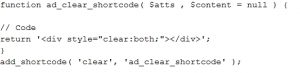
You can write quick HTML to fix such issues. But in case of repeated situation, you may create this handy code using WordPress shortcode feature. Add the following lines in your theme's funtions.php and use the shortcode you clear the areas on left and right in HTML.
Step 1:
function ad_clear_shortcode( $atts , $content = null ) {
// Code
return '
';
}
add_shortcode( 'clear', 'ad_clear_shortcode' );
Step 2:
And when you want to use the clear property, you can simply use the shortcode instead of using the long
Backup of funtions.php is recommended before making any change to it so that you can restore it via FTP or file manager in order something goes wrong in editing.